How to Use a Render Farm as a Studio Team (Without Per-Seat Costs)
Quick Answer: Drop & Render lets your entire studio render from a single shared credit pool with no per-seat charges. Every team member gets their own login, job queue and FTP folder, while admins keep full control over billing, jobs and files from one dashboard. Setup takes minutes through an invite link; no manual account creation needed.
The Problem With Scaling a Render Farm Across a Team
Most render farms are designed for solo artists. One account, one login, one invoice. That works fine when it's just you, but the moment your studio grows to three, ten, or fifty artists, things break down fast:
- Billing chaos. Every artist has their own account and their own invoices. Someone has to reconcile all of it.
- Per-seat costs. Many services charge per user, so your render farm bill scales with headcount instead of actual usage.
- No oversight. You can't see what your team is rendering, how much they're spending, or whether jobs are failing; unless you log into every account individually.
- Credential management. Admins create accounts and passwords for every new hire, then deal with resets and offboarding manually.
For studios working against deadlines, these aren't minor inconveniences. They're workflow bottlenecks that cost real time and money.
How Drop & Render's Team System Works
Drop & Render takes a different approach. Instead of forcing every artist into a separate account, your studio operates as a single team with a shared credit pool and centralized administration.
Every team member gets a full, independent workspace:
- Their own username and password
- Their own render job queue
- Their own account settings and invoices
But all rendering draws from one shared credit balance. You top up once, and your entire team renders from the same pool. One invoice, one payment method, zero per-seat fees.
Admin vs. Member Roles
Drop & Render uses two roles to separate studio-wide control from day-to-day rendering:
| Feature | Admin | Member |
|---|---|---|
| Render jobs through our plugins | Yes | Yes |
| Manage personal account settings | Yes | Yes |
| Monitor personal renders | Yes | Yes |
| Access personal FTP folder | Yes | Yes |
| See personal invoices & usage metrics | Yes | Yes |
| Make payments, set up auto top ups | Yes | No |
| Manage team members | Yes | No |
| Manage studio render settings | Yes | No |
| Monitor studio renders | Yes | No |
| Access studio FTP folder | Yes | No |
| See studio invoices & usage metrics | Yes | No |
Admins can promote any member to admin, or demote an admin back to member, at any time. This means your lead TD or production manager can have full visibility while artists focus on rendering without distractions.
How to Set Up Your Studio Team in Minutes
Getting your team onto Drop & Render takes three steps:
- Create your account and install our plugin through the start rendering guide.
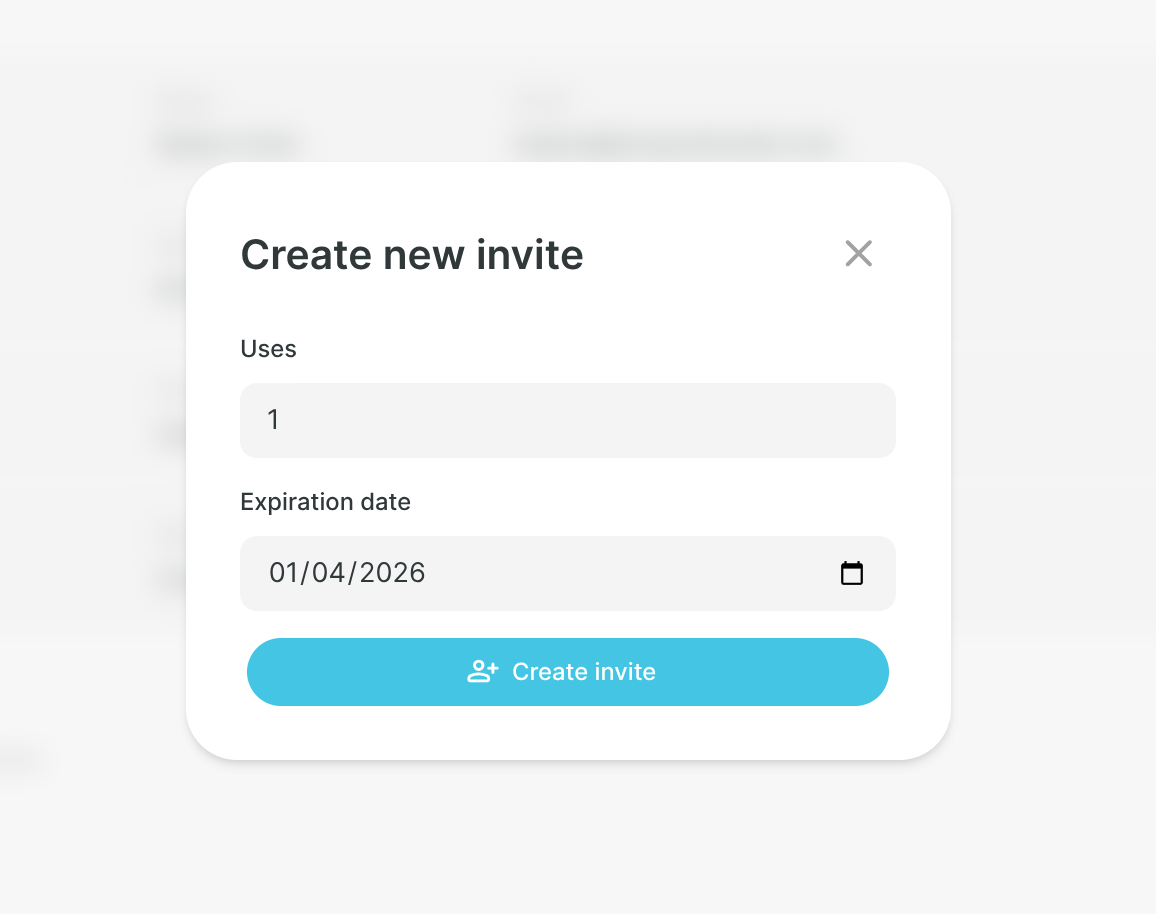
- Open the team page in your dashboard and click Create new invite.
- Share the invite link with your team. Each person picks their own username and password and registers directly into your studio.
How the invite system works
Instead of creating accounts and setting passwords for every team member, admins generate invite links with a set number of uses and an expiration date. Share a single link with your whole team, or create one-off invites for individual hires.
Each invite tracks remaining uses. Expired or fully used invites are automatically marked as inactive. Admins can revoke any invite at any time.
Managing your team
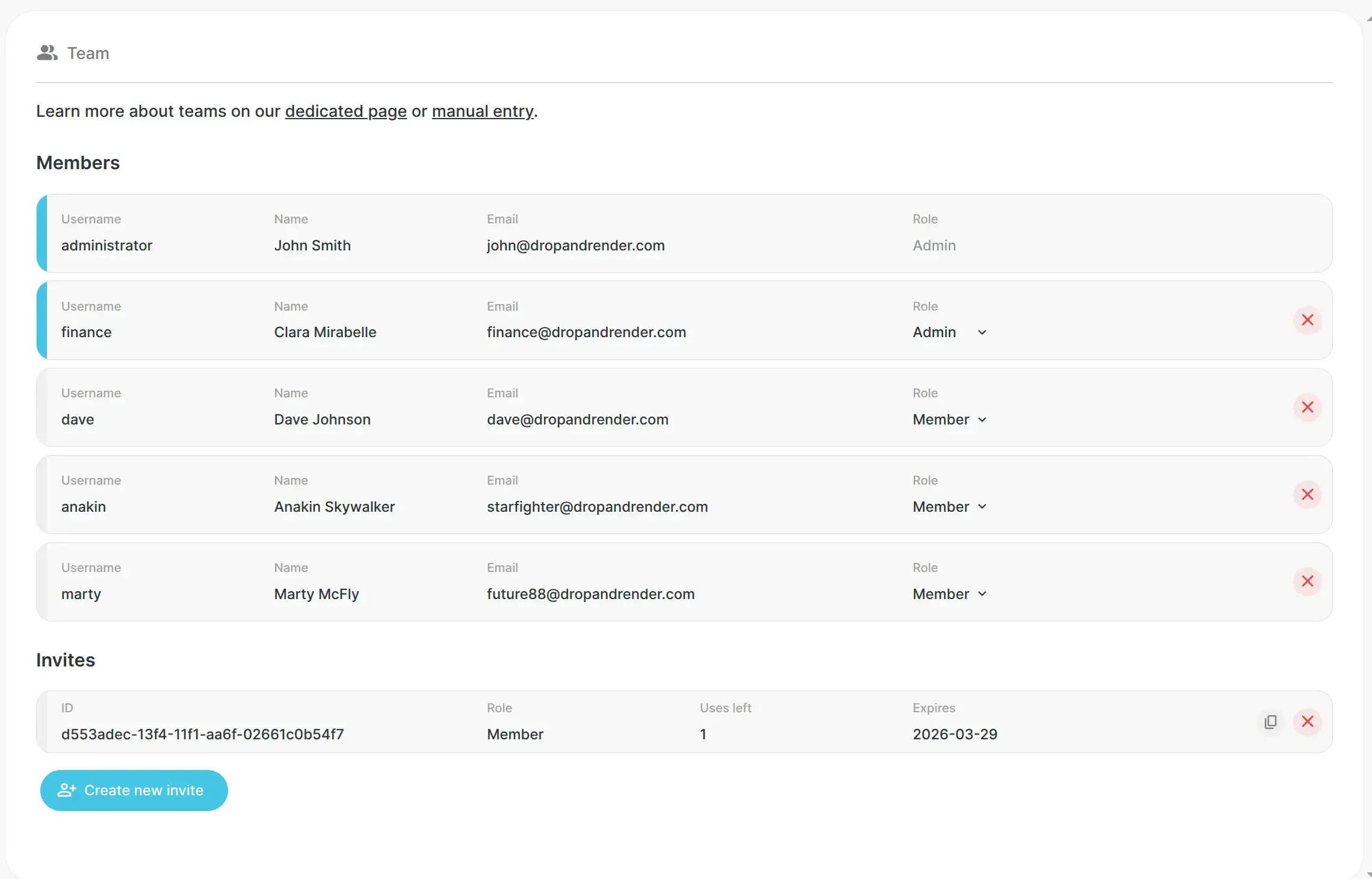
The team management page lives under Dashboard > Team. From here admins can:
- View all members with their username, name, email and role at a glance
- Change roles by toggling between Admin and Member directly in the list
- Remove members instantly when someone leaves the studio
- Create and manage invites with details on active links, remaining uses and expiry dates
Why No Per-Seat Pricing Matters for Studios
Per-seat pricing punishes studios for growing. If you're paying per user on top of render costs, every new hire increases your fixed overhead; even if they barely render anything that month.
Drop & Render's model is different: you only pay for what you render. Whether your team has 2 people or 200, the cost is the same per render credit. There are no user fees, no seat licenses, and no minimum commitments per team member.
This means you can onboard freelancers for a single project, scale your team for a busy quarter, or give every intern access to the farm; without worrying about runaway costs.
Quick Summary: Key Terms
What is a render farm? A render farm is a network of high-performance servers that render your 3D scenes remotely. Instead of tying up your local workstation for hours, you submit your project to the farm and get finished frames back; often many times faster.
What is team rendering? Team rendering means multiple artists in the same studio submit render jobs to a shared render farm. With Drop & Render, each artist works independently while the studio shares a single credit pool and billing account.
What is a shared credit pool? A shared credit pool means your entire team renders from one balance. An admin tops up credits once, and every team member draws from that same pool. No separate billing per artist.
FAQ
How many team members can I add? There is no limit on team size. You can invite as many members as your studio needs, and there is no additional cost per seat.
Can team members see each other's renders or files? No. Each member has their own private job queue and FTP folder. Only admins can view studio-wide renders, files and usage.
Do team members need to install anything? Yes. Each member installs the Drop & Render plugin in their copy of Cinema 4D, Houdini, or Blender. They log in with the credentials they created during invite registration.
Can I have multiple admins? Yes. Any admin can promote a member to admin. This is useful for studios where multiple people handle production management or billing.
What happens when a team member leaves? An admin removes them from the team page. Their farm access is revoked immediately. Any remaining credits stay in the shared pool.
Is there a free trial for teams? Yes. Every new Drop & Render account starts with free credits. Set up your team, invite your artists, and test the full workflow before committing.
Which 3D software is supported? Drop & Render supports Cinema 4D, Houdini, and Blender, each with a dedicated plugin that integrates directly into the application.
Start Rendering as a Team
Set up your studio on Drop & Render in minutes. Shared credits, no per-seat fees, and full admin control from day one.
For a deeper look at team features, visit our dedicated teams page or read the managing teams section of the manual.