Flamenco already gives your Blender studio a familiar way to submit jobs and share the rendering across your machines. We've added another destination to that workflow: the Drop & Render cloud farm.
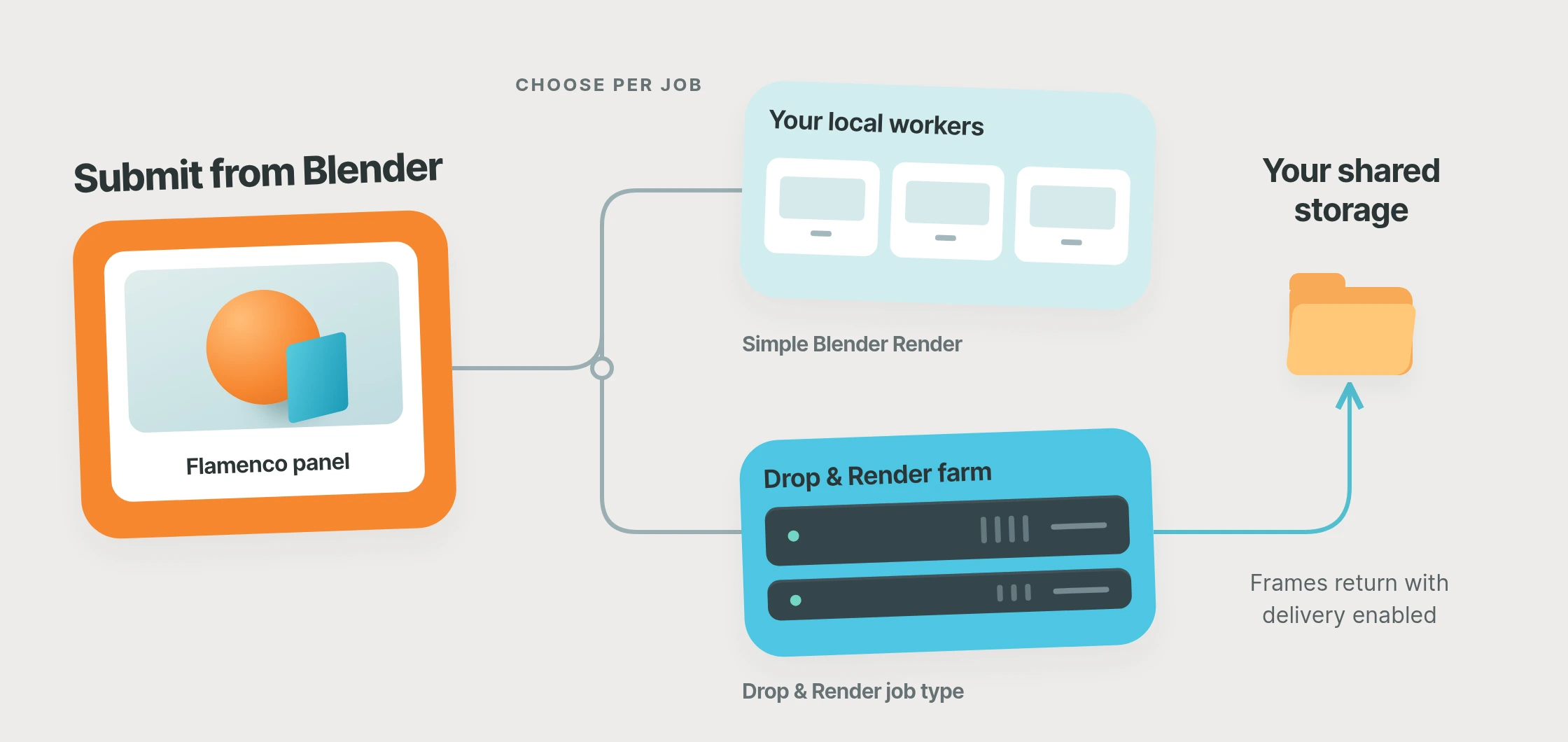
Choose Drop & Render as the job type in Blender's Flamenco panel, and we'll render the project on our machines. With delivery enabled, frames come back to your render output folder and Flamenco follows their progress. Your artists keep working in Blender, and your studio gets more rendering capacity when a project needs it.
Your local farm, with room for bigger projects
Flamenco is Blender Studio's free, open-source render manager. It's a useful way to put your studio's hardware to work, whether you're sharing a few workstations or running a dedicated local farm.
Our Flamenco render farm integration lets you keep that setup and add cloud rendering alongside it. Use Simple Blender Render for everyday work on your own machines, and choose Drop & Render when a long animation or a tight delivery needs more capacity. Both job types live in the same Flamenco queue, so you choose where each project renders.
The Blender workflow you already know
Artists submit from the Flamenco panel as usual. Flamenco packs the scene, and our integration passes it through the Drop & Render Blender add-on to prepare the farm submission. That gives these jobs the same scene checks, add-on detection and farm settings as a submission from our own panel.
Setup happens on the computer running your Flamenco Manager. Link uploads the project and downloads the results, so you do not need to rent cloud machines or configure shared storage for the cloud farm. Your existing local Flamenco storage setup stays in place. Once it's connected, artists already using the Flamenco add-on can choose the new job type without installing anything else on their workstations. Jobs use the credits of the Drop & Render account signed in to Link, keeping the rendering budget together.
If you work directly from Blender rather than through Flamenco, our regular Blender render farm workflow is available too.
Finished frames, back where your team needs them
Choose frame delivery to receive output as frames finish, ready for review or compositing while the rest of the sequence renders. Choose job delivery if you'd prefer to receive the output after the whole render completes. With either option, Flamenco follows the delivered frames.
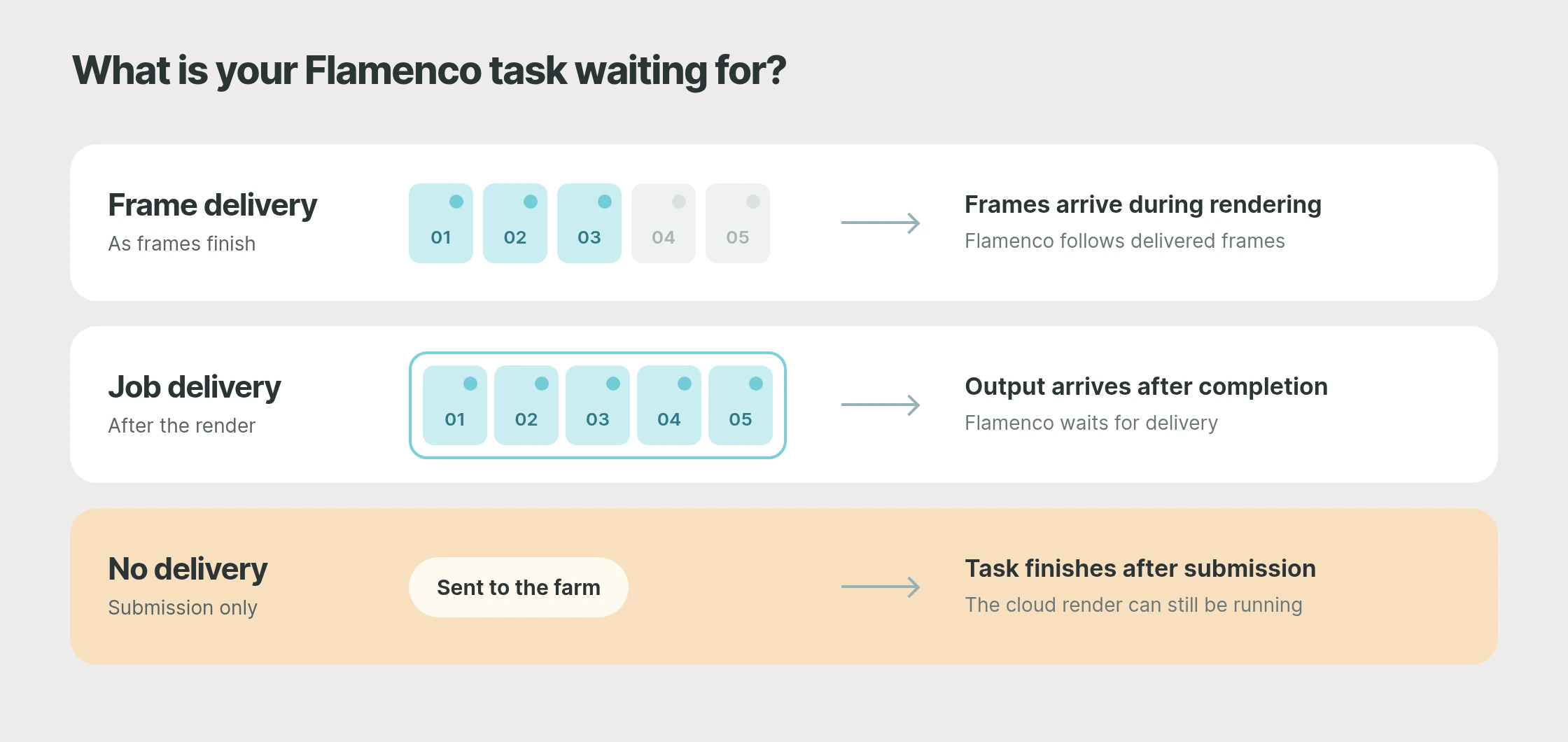
You can also disable automatic delivery and download through the dashboard instead. In that mode, the Flamenco task finishes after submission while the farm continues rendering. For each new job, use an empty output folder so the returned frames belong to that render.
Get connected
On your Flamenco Manager computer, sign in to Link, make sure Blender has the current Drop & Render add-on, and install Flamenco from Extensions. Link finds your local Manager and sets up the worker and job type. Keep Link signed in, then submit a short image sequence from Blender to try the workflow.
Flamenco and our other extensions are completely optional. You can install or uninstall them without affecting Drop & Render's normal functions or cancelling submitted farm renders.
A few things worth knowing
Which Flamenco versions work with Drop & Render?
The integration supports Flamenco 3. Link downloads a worker matching your local Manager, keeping that part of setup automatic.
How much does Flamenco cloud rendering cost?
Flamenco and the Drop & Render extension have no additional fee; jobs sent to the farm use your account's credits at our normal render farm prices. A short test range gives you a useful starting point for your project's budget.
Where do I manage the cloud render?
With delivery enabled, Flamenco follows returned frames and previews. Your jobs also appear in the Drop & Render dashboard, where you can manage the farm render or cancel it if plans change. Cancelling a task in Flamenco does not cancel the accepted farm job; use the dashboard for that action.
For tools outside Flamenco, the render farm API provides JSON requests and results for your own submission scripts. Studios using Deadline can also follow cloud jobs in Deadline 10 Monitor.
Try your next Blender sequence on the farm
New accounts include €25 in free render credits. Pick a project, send a few frames through Flamenco and watch them arrive back in your render output folder. Visit our Flamenco integration page for the full workflow.