Introduction
USD has become the backbone of modern VFX and animation pipelines. But when it comes to rendering USD on a farm, most services leave you with limited options and zero control over how the render actually runs.
Drop & Render gives you three distinct workflows for rendering USD — from fully automatic to fully manual — and puts every husk command-line flag at your fingertips. Whether you're rendering a single shot or submitting 100 USD files at once, you stay in control.
This blog walks through all three options, what makes the new Direct USD Rendering workflow powerful for studios, and how our asset system handles complex USD dependency trees automatically.
The Three USD Rendering Workflows
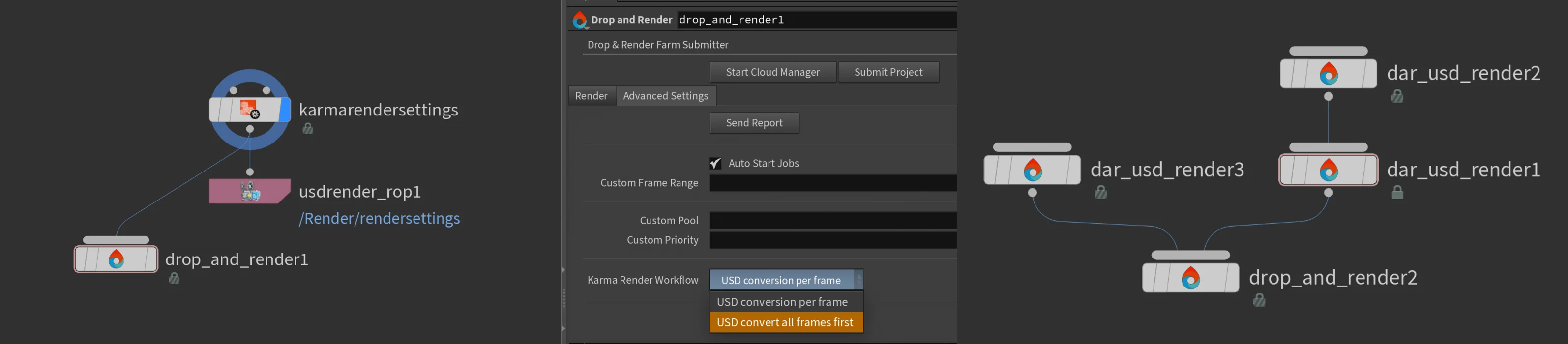
Every USD workflow in Drop & Render starts in Houdini's LOP network and connects to the Drop & Render HDA. The difference is how much control you want over the USD stage before it hits the farm.
Option 1: Render Directly with Karma from Houdini
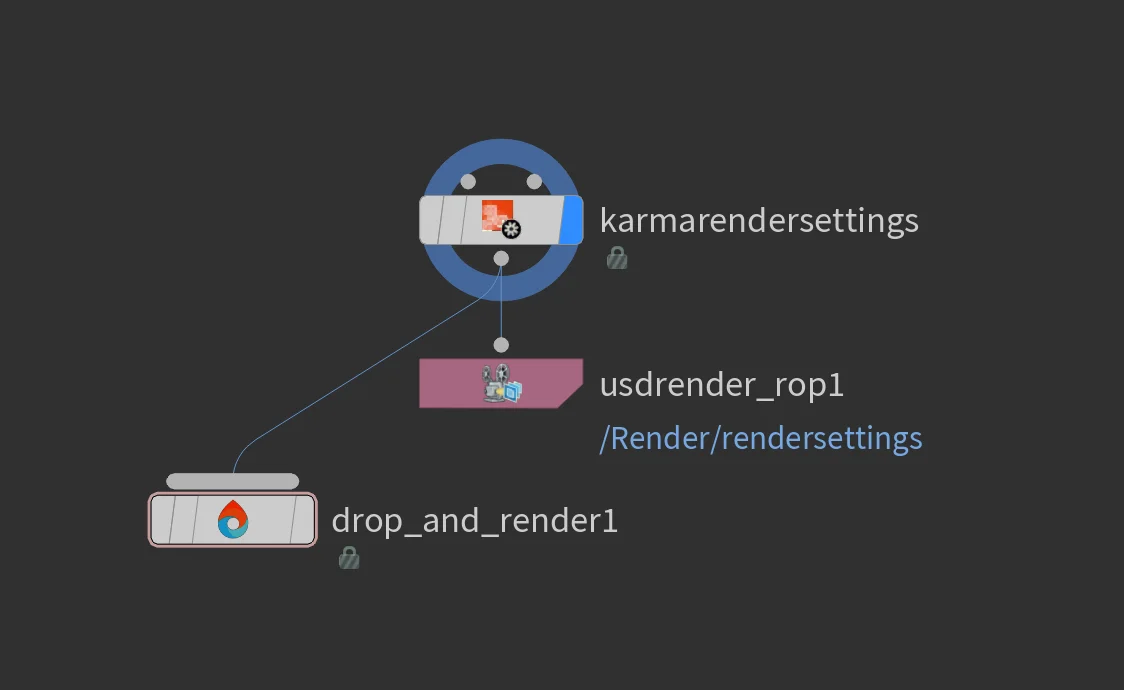
This is the most straightforward approach. You set up your scene in Houdini's Solaris environment, connect your Karma Render Settings node to the Drop & Render HDA, and submit.
On the farm, Houdini opens your project file and renders each frame through Karma — just like pressing render locally. Houdini generates the USD stage internally for every frame and pipes it directly to the renderer.
Best for:
- Artists working entirely inside Houdini
- Scenes where the USD stage changes per-frame (animated materials, procedural geometry)
- Quick turnaround when you don't need frame-level parallelism
Option 2: Convert All Frames First, Then Render with Husk
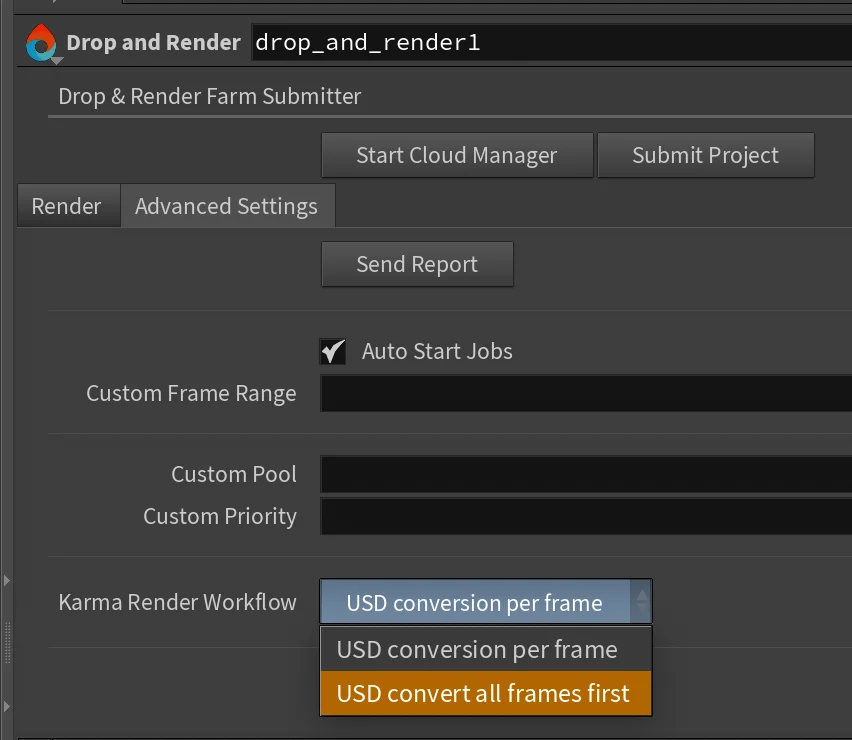
This workflow splits the job into two phases:
- Convert phase: Houdini opens your project on the farm and exports a USD file for every frame. This runs as a single-machine job to ensure consistency.
- Render phase: Once all frames are exported, husk renders every frame in parallel across multiple machines simultaneously.
The render phase uses husk directly — no Houdini session needed. This means faster startup per frame and better farm utilization.
Best for:
- Heavy scenes where the USD export is the bottleneck
- Sequences where you want maximum parallelism during the render phase
- Workflows where you want the USD files as an artifact (for debugging or re-rendering later)
Option 3: Direct USD Rendering
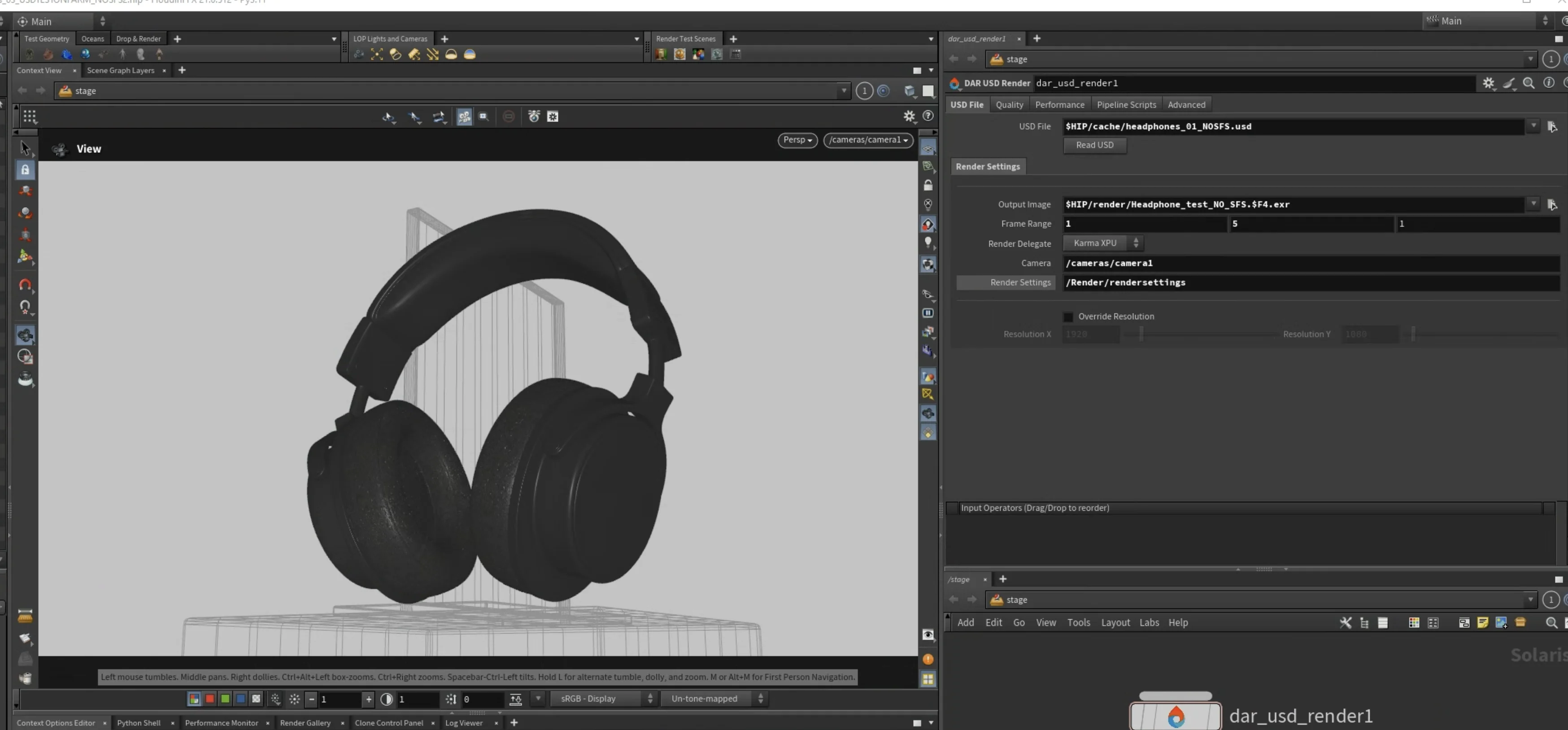
This is the most flexible option, and it gives you the most control. You bring your own final USD file — exported from Houdini, built in your pipeline, or generated by any tool — load it into the DAR USD Render node, and render it directly with husk on the farm.
No Houdini scene file is opened during rendering. Husk reads the USD file and renders it directly using the Hydra render delegate of your choice.
How It Works
- Create a DAR USD Render node in your LOP network
- Set the USD file path — point it to your final
.usd,.usda, or.usdcfile - Click "Read USD" — the node reads your USD file and auto-populates the camera, frame range, render settings prim, and output path directly from the file's metadata
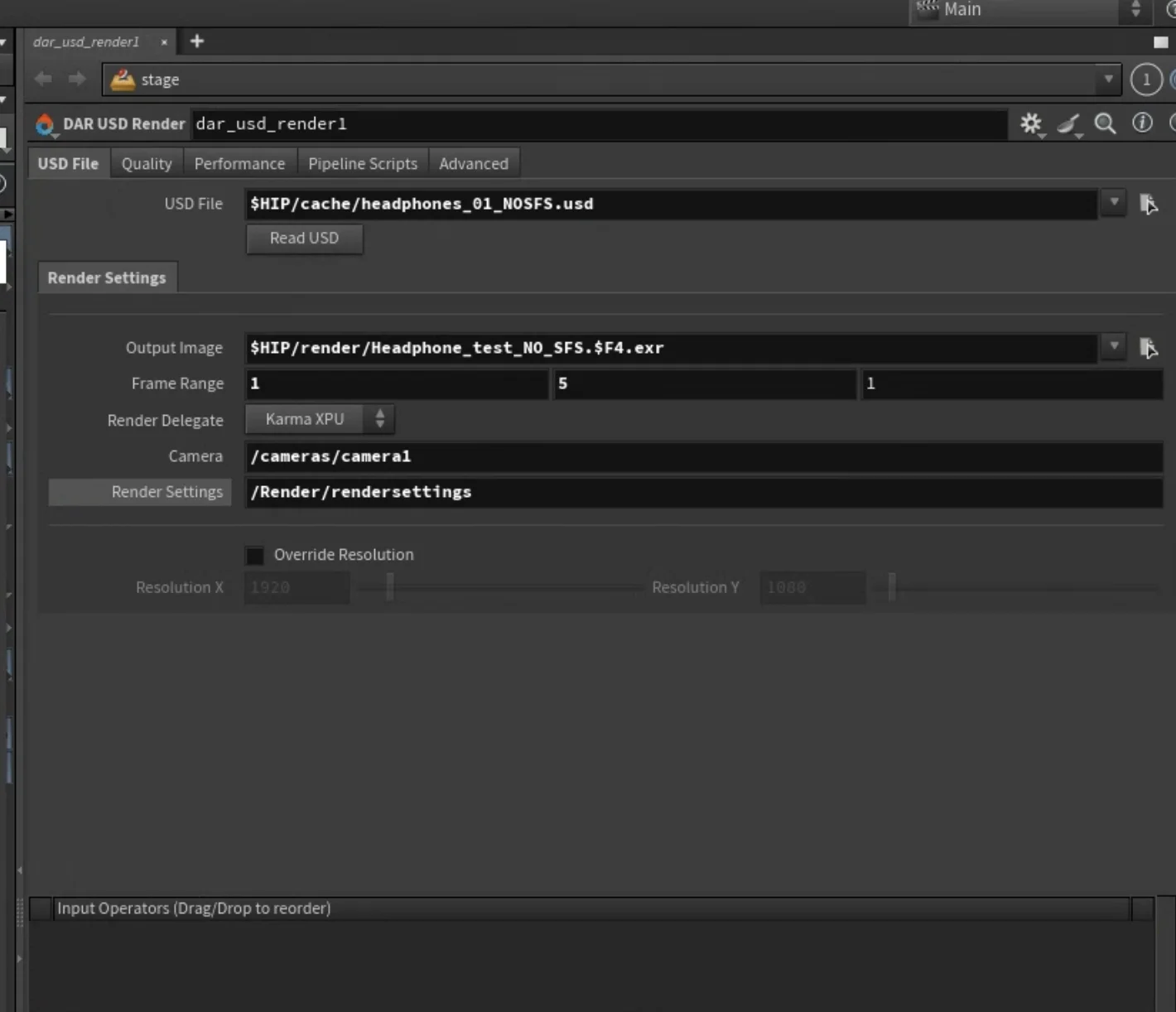
- Choose your render delegate — Karma CPU, Karma XPU, Redshift, or V-Ray
- Adjust settings — override samples, resolution, add pipeline scripts, or set any husk flag
- Connect to the Drop & Render HDA and submit
Full Husk CLI Control
The DAR USD Render node exposes every husk command-line flag as a parameter, organized into clear tabs:
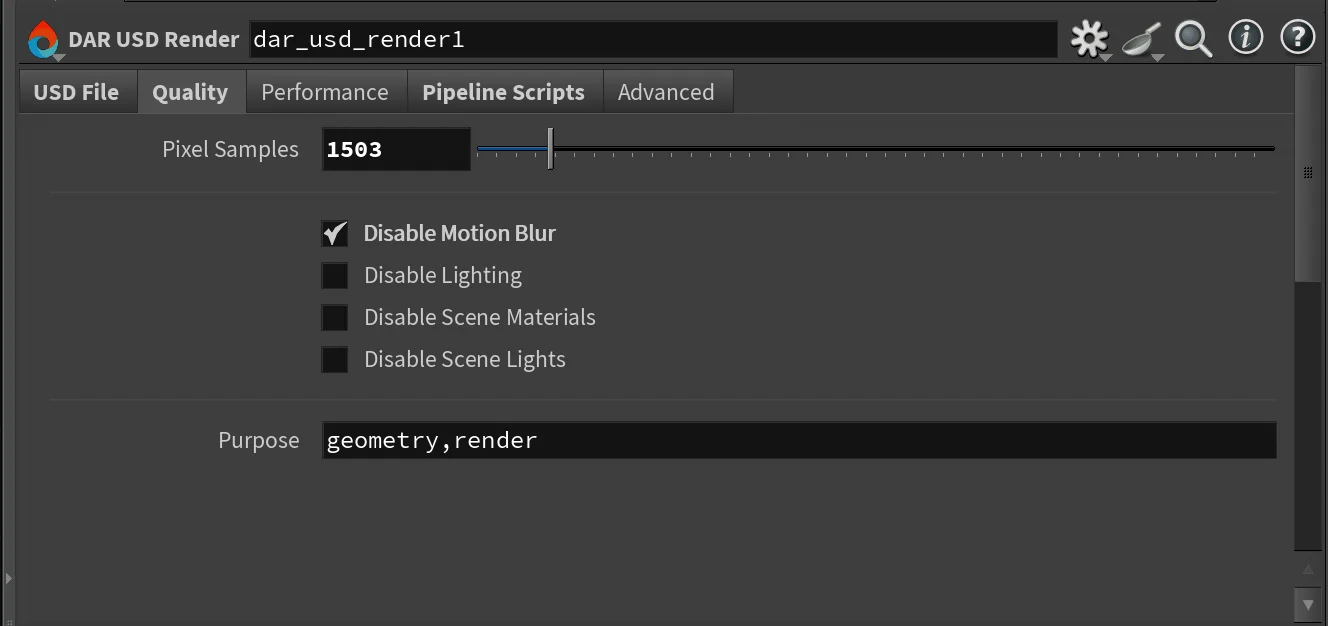
Quality Overrides
- Override pixel samples without editing the USD file
- Disable motion blur, lighting, or materials for quick debug renders
- Filter geometry by purpose (render, proxy, guide)
Performance Tuning
- Control thread count per job
- Set bucket size and render order
- Restart the render delegate every N frames to manage memory on long sequences
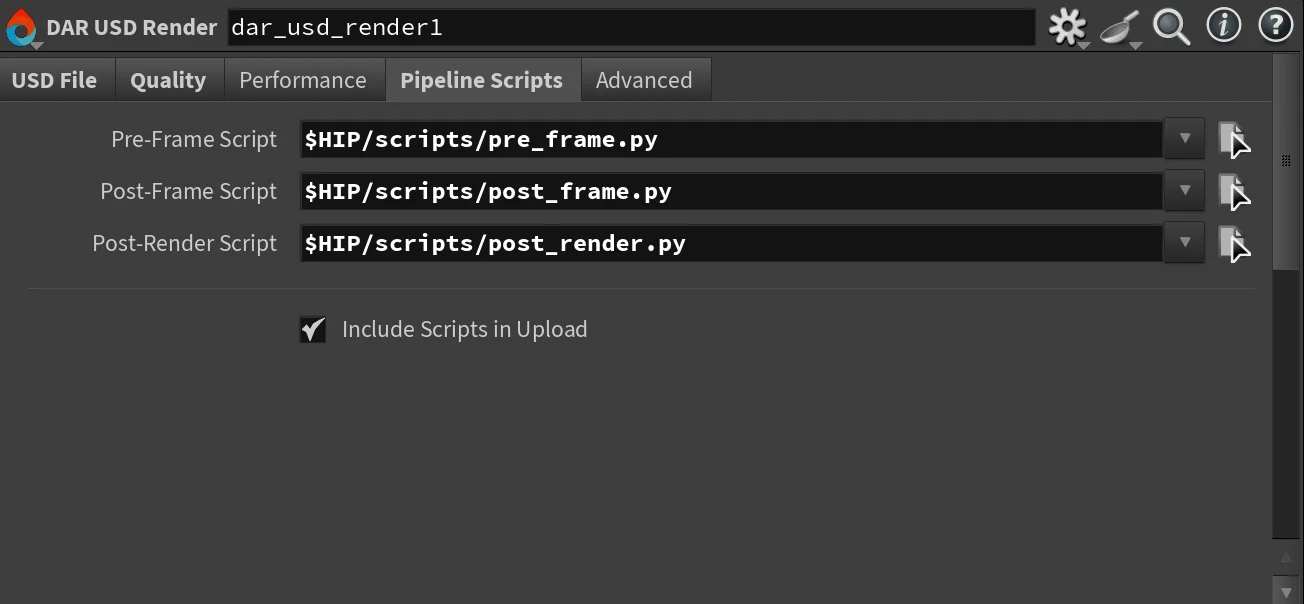
Pipeline Scripts
- Attach pre-frame, post-frame, and post-render Python scripts
- Scripts are automatically uploaded to the farm alongside your USD file
- Full access to the USD stage, render settings, and frame number inside the script
Use cases:
- Skip already-rendered frames by raising
SkipFramein a pre-frame script - Generate thumbnails or validation checks after each frame
- Push status updates to your production tracker after the job completes
# Example pre-frame script: skip frames that already exist
import os
import hou

class SkipFrame(Exception):
    pass

frame = int(hou.frame())
output = settings.get("outputImage", "")
if output and os.path.exists(output.replace("$F4", str(frame).zfill(4))):
    raise SkipFrame
Advanced Pipeline Integration
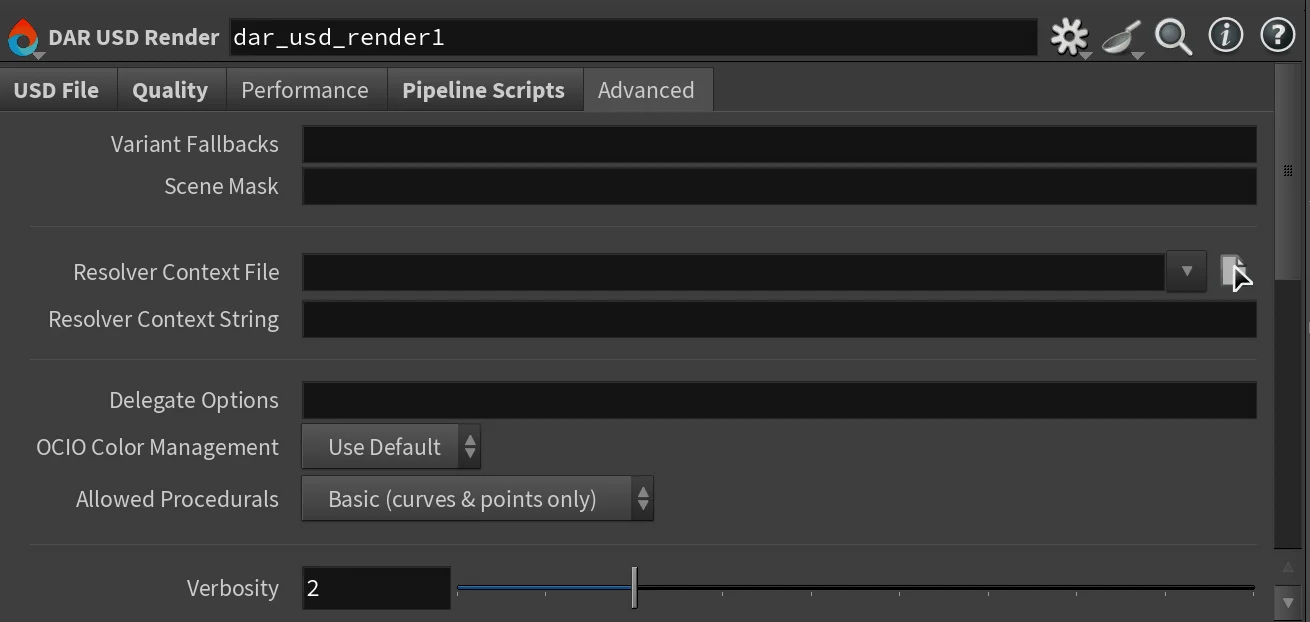
- Variant fallbacks — override variant selections without touching the USD file (e.g.
modelVariant=hero) - Scene mask — render only specific prims for partial re-renders
- Delegate options — pass renderer-specific settings directly to Redshift, V-Ray, or Karma
- OCIO color management — force on or off per job
- Extra husk arguments — a freeform text field for any flag we don't expose as a dedicated parameter. Husk evolves with every Houdini release — this field ensures you're never limited.
For the complete list of husk flags, see the SideFX husk documentation.
Supported Render Delegates
| Render Delegate | Engine | GPU/CPU |
|---|---|---|
| Karma CPU | BRAY_HdKarma |
CPU |
| Karma XPU | BRAY_HdKarmaXPU |
GPU |
| Redshift | HdRedshiftRendererPlugin |
GPU |
| V-Ray | HdVRayRendererPlugin |
GPU |
Each delegate requires the renderer to be installed and licensed on the farm node. Drop & Render's pool system automatically routes your job to the right hardware — GPU jobs go to GPU nodes with the correct renderer installed.
Automatic USD Asset Discovery
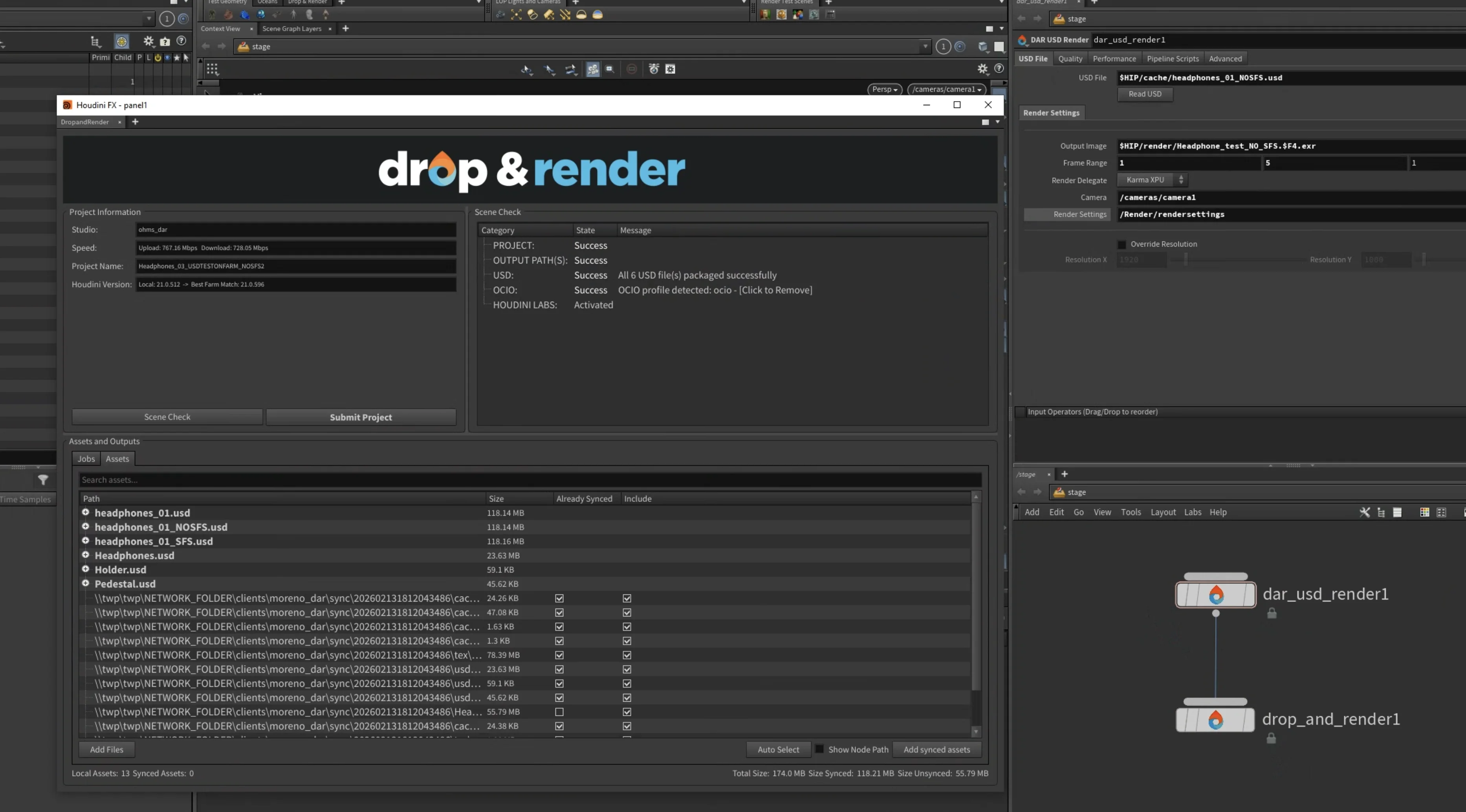
When you submit a job with a USD file, our system doesn't just upload that single file. It opens the USD stage, traverses the entire composition arc, and builds a complete map of every dependency:
- Nested USD references, sublayers, and payloads
- Textures (including UDIM expansion)
- VDB volumes and geometry caches
- MaterialX files
- USD clips and frame sequences
Everything is listed in the Assets tab inside the preflight panel, where you can review exactly what will be uploaded. Files that haven't changed since your last submission are skipped automatically via our content-addressable storage system.
For a deep dive into how our USD asset scanner and CAS storage works, read How Drop & Render Handles USD and Asset Synchronization at Scale.
Multi-Job Submissions and Dependencies
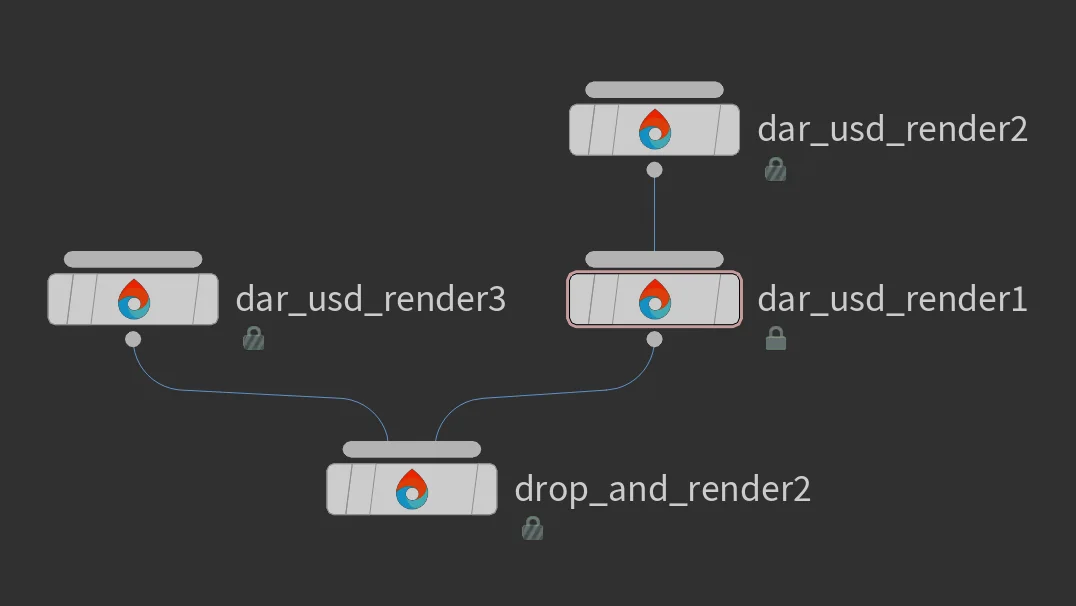
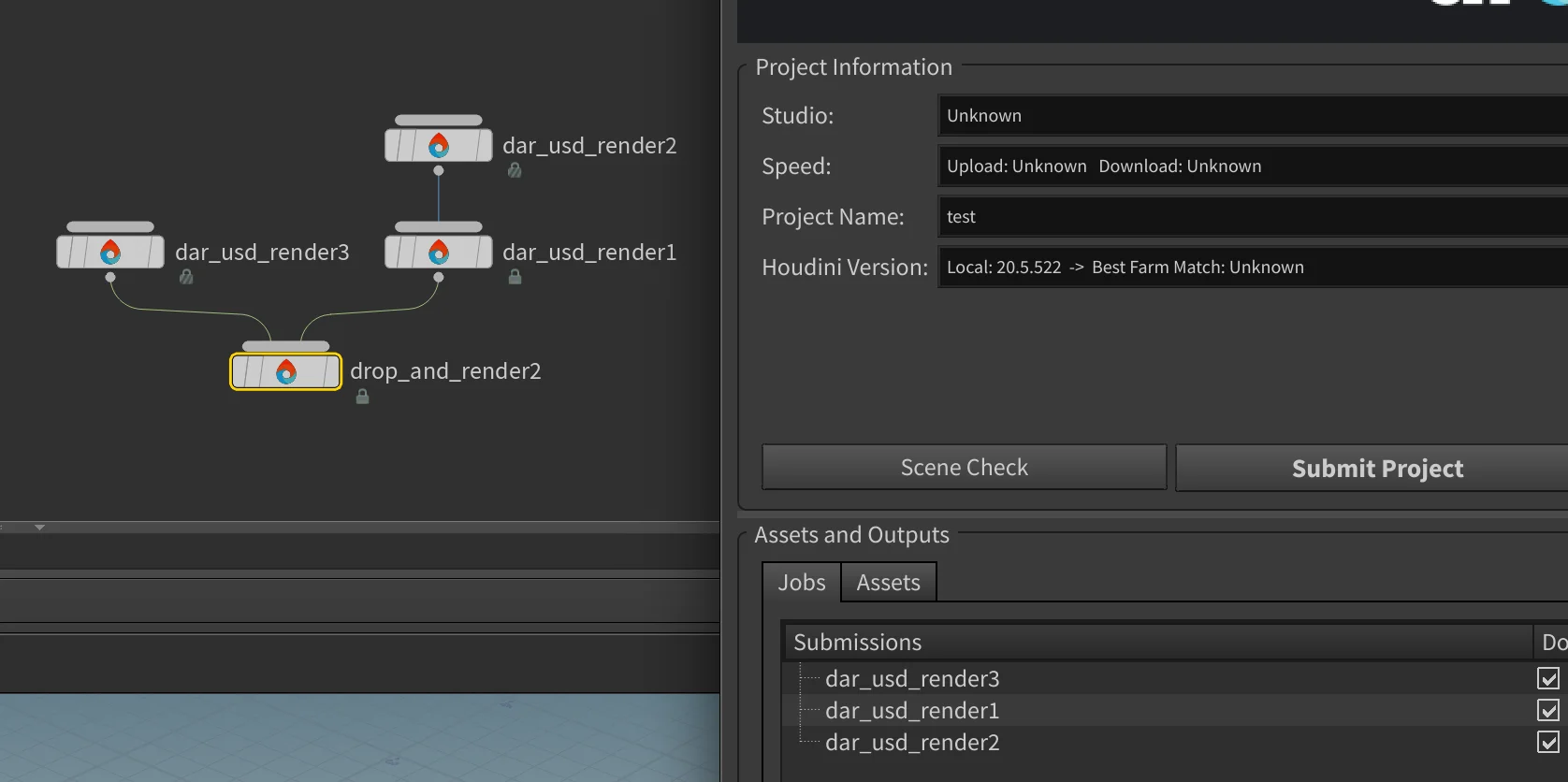
You can connect up to 100 render nodes to a single Drop & Render HDA. This works with any combination of the three USD workflows — or even mixed with standard image renders and file caches.
Parallel rendering: Connect multiple nodes directly to the Drop & Render HDA. All jobs start rendering simultaneously.
Sequential dependencies: Chain nodes in sequence. Each job waits for the previous one to complete before starting. This is useful when one job generates assets that the next job needs — for example, a simulation cache followed by a lighting render.
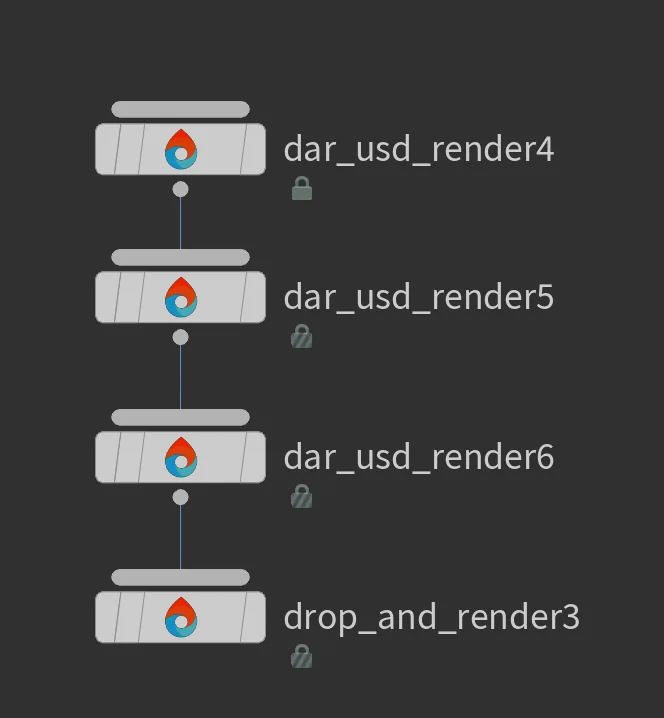
Every job gets its own slice configuration, render delegate, and priority settings. The preflight panel shows all jobs and their dependencies before you submit.
Comparing the Three Workflows
| Option 1: Direct Karma | Option 2: Convert + Husk | Option 3: Direct USD | |
|---|---|---|---|
| Input | Houdini scene | Houdini scene | Standalone USD file |
| Renderer on farm | Houdini + Karma | Houdini (convert) + Husk (render) | Husk only |
| Farm startup | Houdini loads per frame | Houdini once, then husk per frame | Husk per frame (fastest) |
| Parallelism | Per-frame | Conversion serial, render parallel | Fully parallel |
| Husk CLI control | No | No | Yes — full control |
| Pipeline scripts | No | No | Pre-frame, post-frame, post-render |
| Best for | Simple scenes, quick submit | Heavy scenes, max throughput | Studio pipelines, full control |
Houdini USD Rendering: A Quick Summary
What is USD? Universal Scene Description is an open-source framework developed by Pixar for describing, composing, and rendering 3D scenes. It's become the industry standard for exchanging complex scene data between departments and tools in VFX and animation production.
What is husk? Husk is SideFX's command-line USD renderer. It loads a USD file, selects a Hydra render delegate (Karma, Redshift, V-Ray, or any other), and renders it — no graphical interface needed. This makes it ideal for render farms.
What are Hydra render delegates? Hydra is USD's rendering architecture. A render delegate is a plugin that tells Hydra how to actually produce pixels. Karma, Redshift, V-Ray, and Arnold all provide Hydra delegates, meaning they can all render USD files through husk with a single consistent interface.
FAQ
Can I render USD files from any source, not just Houdini?
Yes. The DAR USD Render node accepts any valid USD file — exported from Houdini, Maya, Katana, Nuke, or generated by your pipeline tools. As long as it's a valid .usd, .usda, or .usdc file, husk can render it.
Do I need a Redshift or V-Ray license on the farm? Yes. Husk loads the render delegate as a Hydra plugin. The renderer must be installed and licensed on the farm node. Drop & Render's pool system routes your job to nodes that have the correct renderer available.
Can I override render settings without editing the USD file? Yes. The DAR USD Render node lets you override pixel samples, resolution, motion blur, lighting, variant selections, and more — all without modifying the original USD file. These overrides are passed as husk command-line flags.
How are USD dependencies handled? Our system opens the USD stage and recursively traverses all composition arcs (references, sublayers, payloads, clips). Every dependency is discovered, listed in the preflight panel, and uploaded to the farm. Files that haven't changed are skipped.
Can I submit multiple USD renders at once? Yes. Connect up to 100 render nodes to a single Drop & Render HDA. They can run in parallel or in sequence (with dependency chains).
Can I run custom Python scripts during the render? Yes. The DAR USD Render node supports pre-frame, post-frame, and post-render Python scripts. These scripts have full access to the USD stage and are automatically uploaded to the farm.
What Houdini versions support this? The DAR USD Render HDA works with Houdini 20.0 and newer, including Houdini 21. Any Houdini version that supports the Solaris/LOP context and husk.
Start Rendering Your USD Files
Whether you're rendering a single shot or orchestrating 100 jobs with complex dependencies, Drop & Render gives you a workflow that matches your pipeline — not the other way around.
Start your free trial and see it in action.